

See the Pressure. Choose When to Switch. Keep Moving.
FreshThread makes the technical state of a long Codex task visible. You decide when it’s time to move, then continue in a fresh task without rebuilding the working context by hand.
See What Your Task Is Carrying.
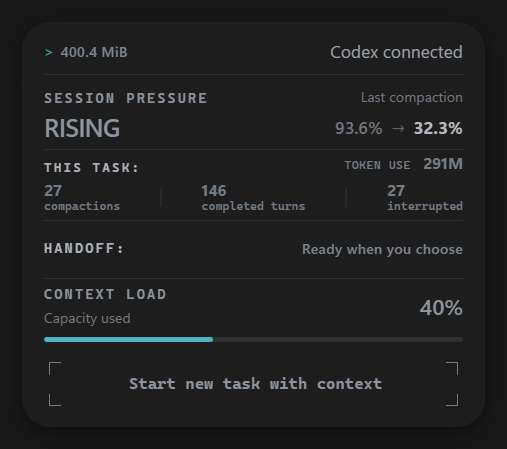
Track factual technical signals that build up during long Codex tasks, including post-compaction load, context load, and compaction activity in real time.
Start Fresh. Keep the Thread.
When you decide to move, you don’t have to rebuild the working context by hand. One click opens a fresh Codex task with your goals, decisions, completed work, constraints, and next steps ready to continue.
One Plan. Full Focus.
Real-time Session Pressure visibility, unlimited one-click handoffs, and local-first processing.
FreshThread Beta
All telemetry signals and one-click handoffs unlocked during the public beta. Free for Windows 10 and 11.
FreshThread is a Windows 10/11 desktop app. Open this page on your PC to install it.
- Keep Your Working Context
- Unlimited One-Click Handoffs
- See Task Load in Real Time
- Track Context Load and Compactions
- Native Windows Overlay for Codex
- Processed Locally on Your PC
Frequently Asked Questions
Key details about how FreshThread works.
While you work, FreshThread prepares the important working context from your current task. It creates the handoff only when Codex is idle, so it doesn’t capture the task mid-response. When you click “Start new task with context,” FreshThread opens a fresh Codex task with the working context needed to verify the current state and continue.
Nothing to rebuild or re-explain. FreshThread automatically opens a new, clean Codex task without triggering a model response. The working context needed to continue is already prepared. Just type “continue”, or give your next instruction, and Codex can verify the current state and pick up where you left off.
Post-compaction load shows how much of the context remains occupied after Codex compacts the task. Watch how it changes over time: if it keeps rising, each compaction is leaving less free context available and the task returns from compaction carrying more context forward. That makes it a useful technical signal during long-running tasks.
FreshThread’s Session Pressure monitoring is content-free: it does not analyze your prompts, code, or conversation text to calculate pressure. Handoff data is prepared locally on your Windows PC, and no code or prompts are sent to a separate FreshThread cloud service.
No. FreshThread shows factual technical signals from your Codex task, including post-compaction load, context load, compaction activity, and session size. You decide whether and when switching makes sense for your workflow.
FreshThread is built specifically for OpenAI Codex on Windows 10 and Windows 11. It automatically detects and binds to your active Codex tasks.
FreshThread doesn’t reduce your session to a single score. It surfaces multiple session signals together, including session size in MiB, completed turns, compactions, interruptions, Session Pressure, and Context Load.
Together, these give you a clearer picture of what is happening inside a long-running Codex task. FreshThread shows you the data; you decide when it makes sense to keep going or start a fresh task with context.
Yes. Session behavior is not strictly linear. Pressure and context load can rise or fall as the task evolves, especially after compaction or changes in the active working context.
A temporary drop does not necessarily mean the session has returned to an earlier state. That is why FreshThread shows several signals together (such as session size, turns, compactions, and current pressure) instead of relying on a one-way countdown.